
Withdrawals
How to Withdraw Bitcoin from Binance to Ledger or Trezor
The address comes from your Ledger or Trezor screen, the network row must say Bitcoin, and each Binance pop-up asks something specific. Fees and minimums as of October 2026.
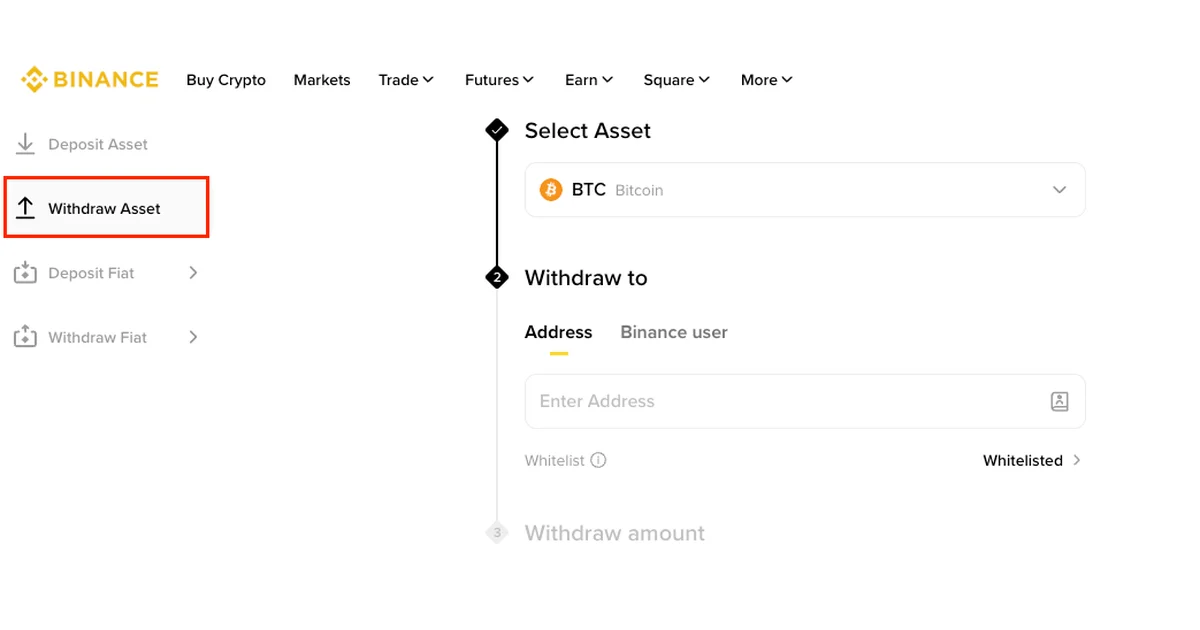
Start on the hardware wallet, not on Binance. Open Receive in Ledger Wallet (the app formerly called Ledger Live) or in Trezor Suite, pick your Bitcoin account, and read the full address on the device's own screen. Then, on the Binance website, go to Assets → Overview → Withdraw → Withdraw Asset (in the app: Assets → Overview → Send → Withdraw Asset), choose BTC, paste the address, and make sure the network reads Bitcoin before you type an amount.
That network charged 0.00002 BTC (2,000 sats, about $1.70) per withdrawal, with a 0.0001 BTC (10,000-sat, about $8.40) minimum, on Binance's public fee table when we opened it on September 25, 2026. Between the form and the final confirmation you may get a pop-up or two, and a new account can be stopped before the form opens at all. Both are covered below, sorted by the words you'll see on screen.
Get the receive address from Ledger or Trezor
The address has to come from the account that will hold the coins. The copy to trust is the one on the hardware wallet's own screen: Ledger calls it the Secure Screen, and Trezor makes you confirm the address on the device before you can copy it.
First money going onto the device? Write down and check the recovery backup before you receive anything. Trezor owners can run the backup check without wiping the device.
Ledger. In Ledger Wallet, following Ledger's own Binance-withdrawal guide (last updated May 13, 2026):
- On the home page, click Receive.
- Select Bitcoin, and the Bitcoin network.
- Connect and unlock the Ledger. The address and a QR code appear. Click Copy address.
- Compare that address with the one on the Ledger's Secure Screen, character by character.
Ledger Wallet can also show an address without the device connected, and Ledger calls those addresses unverified. Skipped step 3? Go back and connect it.
Trezor. In Trezor Suite, connect the Trezor and enter your PIN, select the Bitcoin account in the left column, then click Receive and Show full address. Confirm on the Trezor that its address matches the one in Suite. Suite then lets you copy the address or show a QR code. The QR code is the easier route if you'll paste it into the Binance app on your phone.
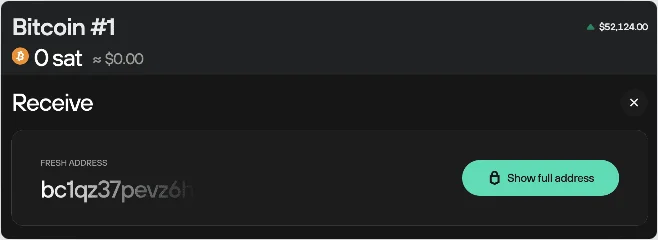
The address stays partly hidden until you click Show full address and confirm it on the Trezor. Screenshot from Trezor's "Moving from Binance to Trezor" guide.
Any other Bitcoin wallet works the same way: open Receive, copy the address, and compare the whole string with what the wallet shows. Binance's Bitcoin row takes on-chain addresses starting with 1, 3, bc1q, or bc1p. A string starting with lnbc is a Lightning invoice, which is a different route. Choosing between Lightning and on-chain covers when that makes sense.
The withdrawal on Binance, step by step
Binance's own walkthrough, "How to Withdraw Crypto from Binance?" (updated September 18, 2026), illustrates these steps with BNB, USDT, and BSC, so a few labels may read slightly differently on a BTC withdrawal.
- Open the withdrawal form. Website: Assets → Overview, click Withdraw, then Withdraw Asset in the left menu. App: Assets → Overview → Send → Withdraw Asset, then choose the account to send from.
- Select BTC as the asset.
- Paste the address under the Address tab. The Binance user tab next to it sends to another Binance account by email, phone, or Binance ID. Not what you want here. Compare the pasted address with the one on your device once more.
- Check the network. It should fill in automatically from the address. Make sure it reads Bitcoin. The next section explains why the other rows are traps.
- Enter the amount and read the fee and the amount that will arrive, both shown under the amount box.
- Click Withdraw and deal with any pop-ups. On the website you then confirm the network, check the details and click Continue. In the app you check the address and network and slide to confirm.
- Complete the security verification with your passkey or 2FA method. The request is submitted, and the status page takes over.
Which BTC network row is real bitcoin?
Binance lists BTC on five networks. Only one of them sends bitcoin that a Ledger or Trezor Bitcoin account can receive. Here's the BTC section of the fee table as of October 8, 2026:
| Network row | Withdrawal fee | Minimum | What it sends | For a Ledger or Trezor Bitcoin account? |
|---|---|---|---|---|
| Bitcoin | 0.00002 BTC (2,000 sats) | 0.0001 BTC (10,000 sats) | Native bitcoin, on-chain | Yes |
| Lightning Network | 0.000001 BTC (100 sats) | 0.00002 BTC (2,000 sats) | Bitcoin to a Lightning invoice, up to 0.01 BTC per withdrawal | No, it needs an lnbc invoice, not an address |
| BNB Smart Chain (BEP20) | 28 sats | 56 sats | A token on BNB Smart Chain, to a 0x address |
No |
| Ethereum (ERC20) | 930 sats | 1,900 sats | A token on Ethereum, to a 0x address |
No |
| BTC (SegWit) | 0.001 BTC (100,000 sats) | 0.002 BTC | Nothing: withdrawals on this row were switched off | No |
The cheap rows aren't cheaper bitcoin. Trezor's warning is blunt: bitcoin sent over any network other than the Bitcoin network isn't real bitcoin, and you could lose it. For a hardware wallet, pick the Bitcoin row. There is no second choice.
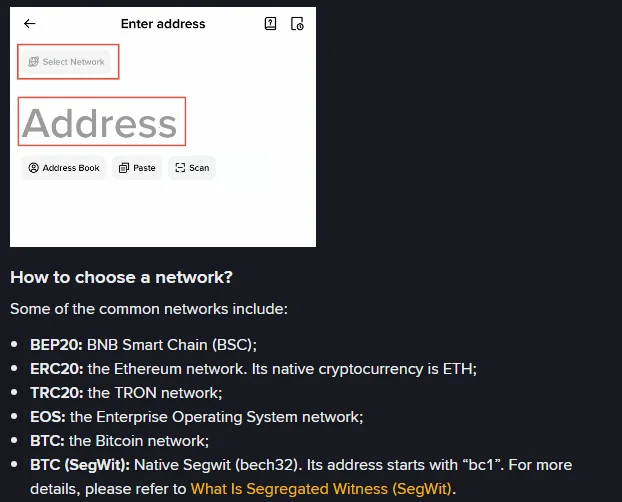
The line to notice is at the bottom: "BTC (SegWit)", described for addresses starting with bc1. The app screen above it is Binance's generic example.
That description is a trap for anyone whose address starts with bc1, as the one in Trezor's example does. We checked Binance's public network data on September 25, 2026. It listed bc1q and bc1p addresses as valid on the Bitcoin row, and it marked the BTC (SegWit) row with "Withdrawal for this token is not supported, please try other networks." A bc1 address goes on the row named Bitcoin. Whatever your menu shows on the day, confirm two things before you continue: the row name, and a fee of 0.00002 BTC.
Binance BTC withdrawal fee and minimum
The Bitcoin-network fee is a flat 0.00002 BTC whether you send 0.001 BTC or 1 BTC. The smallest withdrawal it accepts is 0.0001 BTC. Dollar figures in this article use a BTC price near $84,000, the mempool.space quote on September 25, 2026. Binance can change withdrawal fees without notice and sends you to the withdrawal page for the current figure, so the number under your amount box is the quote that counts.
The app takes the amount two ways, with different results:
| You type 500,000 sats as the... | Debited from Binance | Arrives in your wallet |
|---|---|---|
| Receive amount | 502,000 sats | 500,000 sats |
| Withdrawal amount | 500,000 sats | 498,000 sats |
Switch between them and, in Binance's examples, a Change Receive Amount sheet shows the new Withdraw Amount and Receive amount. Read both before tapping Confirm. On the website, the receive amount and the network fee sit below the amount box, next to lines for Available Withdraw and a 24h remaining limit. Form refuses your amount? Check it against those two lines and the minimum.
The minimum is only the floor. At 10,000 sats, the 2,000-sat fee takes 20% of what you send. For a first transfer, picking a test amount balances that fee against what you could afford to lose. For later transfers, a withdrawal threshold tells you how much to let build up before paying the fee again. And if 2,000 sats looks steep next to the network fees quoted elsewhere, the gap between the two is Binance's pricing, not the miners'.
Pop-ups before the withdrawal goes through
Three prompts can appear after you click Withdraw. What to do depends on the words in the box.
"You haven't withdrawn funds from this address recently"
The full text reads: "You haven't withdrawn funds from this address recently. Please try withdrawing a small amount first to verify that the address information is correct." It sits in a yellow box above the amount, with a Minimum Amount link beside it.
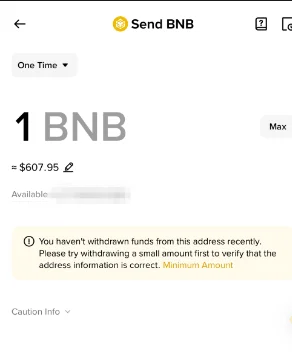
Binance's example is a BNB send, but the yellow box and its Minimum Amount link are what to look for.
It's a suggestion, not a block. The wording ties it to addresses you haven't withdrawn to recently, so a brand-new address from your Ledger or Trezor can be expected to bring it up. On your first withdrawal to this device, take the hint and send a small amount. If you've already tested an address from the same account and verified this one on the device, go ahead.
RW00357: a suspicious withdrawal address
The message begins "[RW00357] The transaction activity associated with your intended withdrawal address is suspicious" and goes on to say the activity "is similar to that seen with recent scams. If strangers directed you to transfer funds, you are likely being scammed." The buttons are Stop and Go Back and Continue.
Click Stop and Go Back. An address you just generated on your own hardware wallet is unlikely to have the kind of history Binance flags, so first make sure the address in the form is the one your device showed. Clear the field, get the address from the device again, and paste it fresh. If someone else gave you the address, or someone is guiding you through this withdrawal, stop entirely. That's exactly the situation the warning describes, and Binance asks you to report it rather than continue.
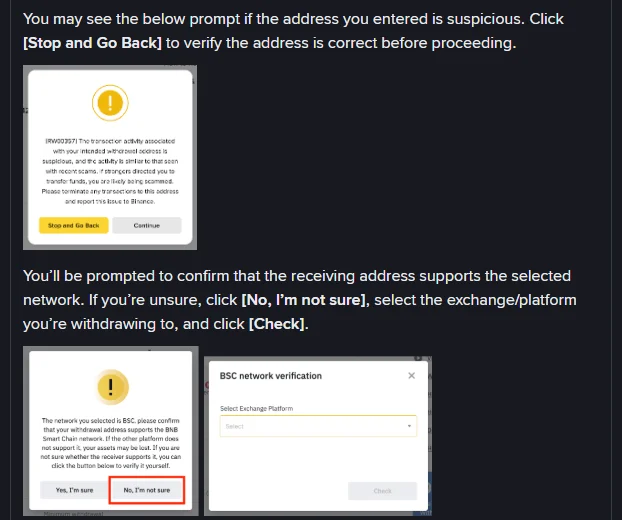
Two prompts, top to bottom: the RW00357 warning, then the network check. Binance's example names BSC in the second one. On a correct BTC withdrawal it should name Bitcoin.
Network confirmation: "Yes, I'm sure" or "No, I'm not sure"
This prompt begins "The network you selected is", names a network, and asks you to confirm that your withdrawal address supports it. Read the network name in that sentence:
- It names Bitcoin, and the address came from your Bitcoin account on the device: choose Yes, I'm sure.
- It names BSC, Ethereum, or anything else: choose No, I'm not sure, close the check, and go back to the network setting. You're on the wrong row, and a Ledger or Trezor Bitcoin address can't receive from it.
The No button opens a network verification box that asks you to select an exchange platform and click Check. In Binance's examples it answers either "The trading platform selected does not currently support BSC network deposits and withdrawals" or "This platform may support BSC for selected coins only." That tool is built for sending to another exchange. Your hardware wallet already told you the network when it generated the address.
A saved or whitelisted address
The web form shows a Whitelist line under the address box. With Binance's withdrawal whitelist turned on, you can only withdraw to addresses on it, so add your new Ledger or Trezor address first under Settings → Withdrawal → Address Management. Changing the whitelist may pause withdrawals for 24, 48, or 72 hours, and with the whitelist withdrawal limit turned on, newly added addresses stay locked for the period you chose. Add the address a few days before you need it, and choose Wallet Address as its origin.
Messages that stop a withdrawal
Sometimes the problem shows up before any pop-up: the withdrawal page won't let you continue, or a message says withdrawals are suspended. Find your case in the left column. Quoted wording is Binance's own, from its help pages.
| What you see or did | What Binance says it means | What to do |
|---|---|---|
| New account, withdrawal not allowed, fewer than three security methods set up | "You need to activate at least three authentications before you can withdraw funds." | Go to Profile → Security and add methods such as a passkey, Binance Authenticator, or SMS until three are active. |
| Identity verification not finished, or the details you sent were incomplete | Withdrawals stay suspended until verification is complete. | Finish verification. If Binance says your details were incomplete, contact Binance Support to provide the rest. |
| Lower withdrawal limit than expected | Face verification wasn't completed, so the amount is limited. | Check the limits under Identification and complete the face check. |
| "Your withdrawal may be at risk. You can try again in 24 hours." | The withdrawal is under review. | Wait for Binance's email about the result. |
| "Your withdrawal may be at risk. You can try again in 48 hours." | A security hold that can't be lifted early. | Wait the 48 hours. |
| You changed your password or another security setting | Withdrawals pause for 24 to 48 hours. | Wait; the pause ends on its own and can't be shortened. |
| "Your withdrawal function may be suspended due to risk of fraudulent activity." | Anti-scam checks, which can include a questionnaire, warnings to acknowledge, and a cool-down period. | Answer the questionnaire truthfully. If anyone is directing you to move the money, stop. |
| An alert on the withdrawal page saying identity verification failed | Binance needs documents before withdrawals resume. | Click Withdraw appeal on the alert (app: Wallets → Spot → Withdraw, then Appeal in the pop-up) and submit what it asks for. |
| You've logged in from several IP addresses | Binance may treat it as suspicious and pause withdrawals. | Contact Binance Support to verify your identity. |
| A restriction notice by email, SMS, or a pop-up at login | Binance has limited the account. | Contact Customer Service. Not every restriction can be appealed. |
On an account that's only days old, the first two rows are the usual cause. Our Binance sign-up and security walkthrough takes identity verification and the security methods in the order Binance expects them. Start there, too, if you don't have a Binance account yet.
None of these holds needs your hardware wallet's recovery words. Anyone offering to lift one for a fee isn't Binance.
After you submit: Processing, Completed, and the TXID
Find the withdrawal on the website under Orders → Transaction History, or in the app under Assets → Overview by tapping the Transaction History icon on the right. Two statuses matter:
- Processing: Binance hasn't finished sending it. Wait.
- Completed: the funds have been sent. Click the TxID to open the transaction details.
The TXID is how you follow the payment from here. On the explorer you can watch it pick up confirmations, which also tells you roughly when it will show in Ledger Wallet or Trezor Suite. Blocks come every 10 minutes on average, but individual gaps vary. Finding and reading a Bitcoin TXID walks through what the explorer page shows. If the status says Completed and an hour later your device still shows nothing, or there's no TXID at all, work out which stage it's stuck in before you send anything else.
For the next withdrawal, generate a new receive address on the device and verify it the same way. Expect the same notice again: it's about the address, not about you.