
Buying Bitcoin
How to Register on Binance, Add a Referral Code and Secure It
Sign up on Binance.com with referral code BNW666 for up to 20% off eligible trading fees (Binance shows your actual rate at signup), then pass identity checks and set the security options withdrawals need.
Save up to 20% on eligible trading fees when you create your Binance account with code BNW666. The discount that applies to you is the one Binance shows during signup. If the link doesn't fill in the code, type BNW666 into the referral field yourself. The code has to be linked to your account for any discount to apply, so add it while you sign up. After signing up, verify your identity and set up withdrawal security before adding funds.
Promotional link; we may earn a commission. Crypto trading involves risk. This is not investment advice.
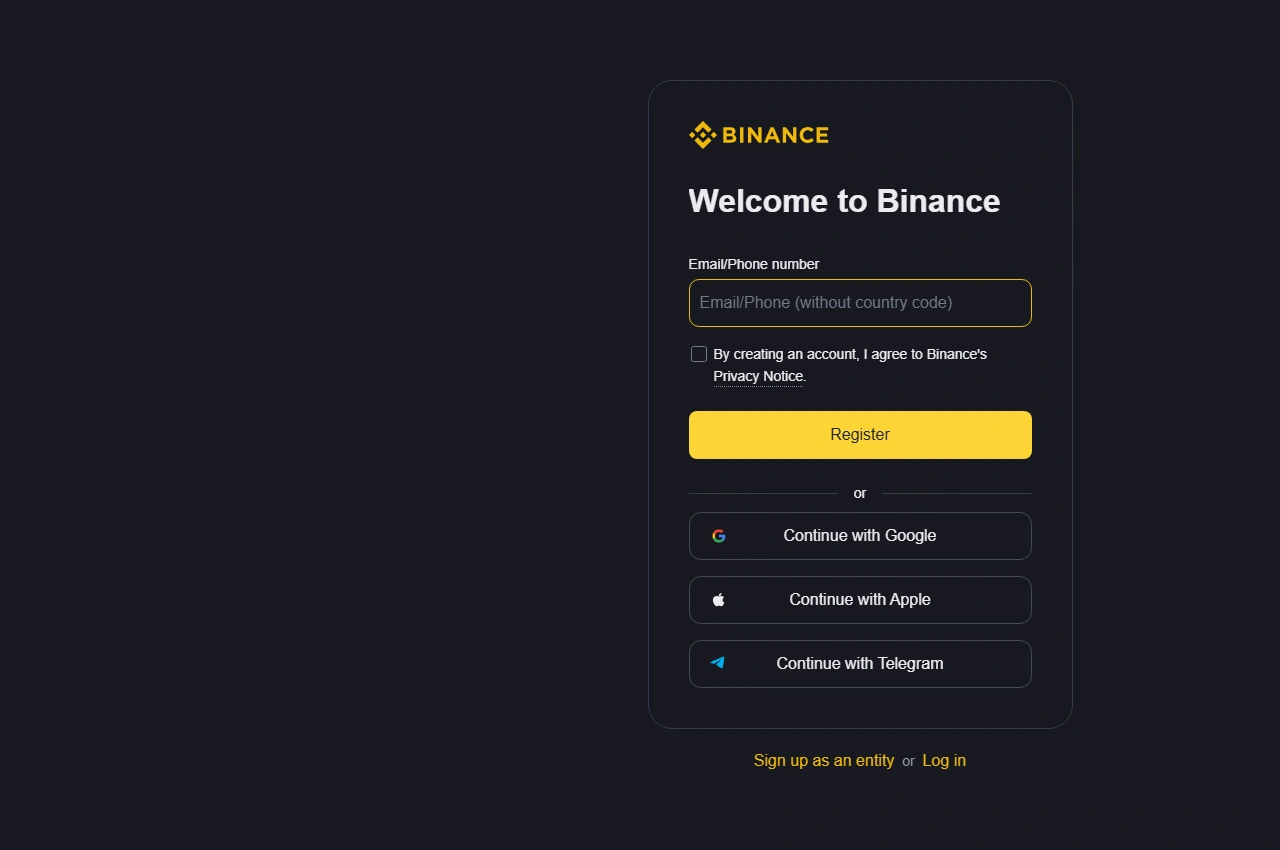
Binance's signup form, before anything is entered.
Before you register
Binance.com is not open to anyone located in or resident in the United States, or to US citizens. Binance.US is a separate company that operates in the US under its own terms. Binance's Terms of Use point to a List of Prohibited Countries. In the version updated January 5, 2026, that list also excludes anyone located in or resident in Canada or the Netherlands, and it names other places after those. Check it for your own country, then check the options offered for your actual country of residence. The Terms require individual users to be at least 18, or the age of majority where they live if that is higher. If the service or a required verification option is unavailable to you, stop and look for a provider that serves your country; comparing small-purchase costs starts with that eligibility check. Do not select a false country or try to get around a restriction.
Have ready an email account you control (with access to its security and recovery settings), the identity documents requested for your location, and a password manager or another reliable place to keep a unique password. Nobody offering to register for you should get your identity documents, authentication codes, or passwords.
You don't need to deposit anything for the setup and security checks in this guide.
1. Open the registration form
Open Binance's signup page with code BNW666. For an ordinary personal account, stay on the personal form, not the entity-account option. Keep the tab open through email verification and the referral check.
Email already registered? Log in or use account recovery instead.
2. Verify your email
Enter your own email address. Read the terms and privacy notice presented, and continue only if you accept them. Binance emails you a verification code. Enter it in the same tab, then follow the password prompt.
Pick a unique password, not your email password. Signing up through Google, Apple, or another identity provider can change the sequence. The email route here matches Binance's website registration guide.
No email? Check the spelling and your spam folder, wait for the resend option, and use the newest code. Stick to one registration tab so you know which code is current. Never give a code to someone in a direct message, even if they claim to be support.
Check that the referral code is linked
After creating your password, look for the referral confirmation: a green tick and Linked, which appear once a code is attached. The code shown should be BNW666. Check it before you continue.
- The field is empty: enter BNW666 while the form still allows it, then look for the confirmation.
- The code is marked invalid: you can edit it or enter another code before it links. Still won't link? Take a screenshot of the error before you continue.
- A different code is already linked: Binance says a linked code cannot be changed or removed. Closing the account and opening another won't fix it either. Binance's referral FAQ says it may end referral commissions on a new account opened that way.
Missed the field entirely? Under the Referral Pro FAQ, a code can be added after signup only while every one of these conditions holds: the account is under 30 days old, has no deposits or trades, has no existing referral relationship, and is a main account rather than a sub-account, and your identity details haven't been used on another account in the past 180 days. The binding page makes the final call. The reliable route is still the signup page, where none of that applies.
Review the referral benefit shown for your account before your first trade. The discount applies to eligible trading fees. Bitcoin withdrawal charges and network fees are separate costs.
3. Complete identity checks
On the website, open Account → Identification and pick the verification option shown. Select your actual country of residence, the country or region that issued your document, and an accepted document type. Upload the document images. Do the camera-based liveness check. Review your personal details carefully before confirming them. Requirements vary by country, and the identity verification guide has the current steps.
Use a clear, current document. Its edges and required details should be visible, with no glare over the text. Do the camera step yourself. No altered documents, and no one else's identity.
After submitting, wait for approval before funding. The verification guide says documents are usually reviewed within 48 hours, sometimes longer. Go by the status shown in your account.
Rejected? Read the stated reason. An unreadable image needs a clearer replacement. A detail mismatch means correcting the relevant information.
Reason unclear, or no accepted document type matches what you hold? Ask a person: click the Binance Support icon, choose Get Support, then Customer Service, and attach a screenshot of the rejection. Personal details can't be edited once you confirm them, so a mistake there also goes through support.
4. Secure your account
Open Profile → Account → Security and review the available authentication methods. Add a passkey on a device or security key you control, and know how you'd get back in if you lost that device. Binance Support's self-service tools include a 2FA reset for that case. Setup choices for each device type are in the passkey guide.
Authenticator app? Store its recovery information privately. Lock down the email account too, since recovery often runs through it. And keep one unlocked phone from being the only place that holds every password, authentication method, and recovery instruction.
One convenient login method isn't enough. Missing two-factor authentication blocks withdrawals, and Binance's identity-verification FAQ says at least three authentication methods must be active before you can withdraw. Clear any unmet requirement in the Security settings before depositing.
Set an anti-phishing code: Security → Advanced Security → Anti-Phishing Code → Enable → Create, then submit it and complete the security verification. If the labels differ, use the current setup instructions. A missing or wrong code means distrust the message. A correct code alone doesn't make every link safe, so for anything unexpected, open the account yourself instead of following the link.
Once your own wallet address is verified, turn on the withdrawal whitelist under Settings → Withdrawal. It limits withdrawals to addresses you have saved. Check the whitelist withdrawal limit first. The documented options are 24, 48, or 72 hours, and changing the whitelist can pause withdrawals for that long. Steps are in the withdrawal settings guide. Never add an address supplied by a stranger.
An exchange login password, an authenticator code, and a Bitcoin wallet backup are three different secrets. Registration never needs the recovery words of a self-custody wallet. Any person or page asking for them is your cue to stop.
5. Check BTC withdrawals
Before funding, look at the payment methods and their charges. Then open the Binance crypto fee page and find the BTC row for your wallet's network. When we opened it in September 2026, it listed 2,000 sats (0.00002 BTC) to withdraw on the Bitcoin network, with a 10,000-sat minimum. A separate "BTC (SegWit)" row listed 0.001 BTC, fifty times as much. Pick the row named Bitcoin. Account-specific limits or temporary restrictions can still apply. When you're ready to move coins out, the withdrawal walkthrough for Ledger, Trezor, and other wallets covers the form and the pop-ups it can show.
Withdrawal page blocked? Read the message first. It tells you which case you're in. The common ones, from Binance's page on suspended withdrawals:
- After a security change such as a new password, withdrawals pause for 24 to 48 hours. The pause lifts by itself and can't be ended early.
- "Your withdrawal may be at risk. You can try again in 24 hours" means the withdrawal is under review. Watch your email for the result. The 48-hour version of the message can't be lifted early either.
- Failed identity verification during a withdrawal check: use Withdraw appeal on the Withdraw Crypto page and submit the documents it asks for.
- A restriction set by Binance comes with a notice and a pop-up at login giving the reason. Appeals go through Customer Service, and not every restriction can be appealed, particularly those tied to law-enforcement or regulatory orders.
- A disabled or locked account is unlocked from the pop-up at login, following Binance's unlock guide. Allow up to 48 hours after unlocking before you can withdraw.
Binance allows each person one verified personal account, so a second one is no way around any of these. Anyone offering to "unlock" an account for a fee is not Binance.
Buying small amounts on a schedule? Preview one purchase at your usual size first. At $25 or $50 a time, the order minimum and the card or payment charge can matter more than a trading-fee discount. This cost comparison shows how to weigh purchase and withdrawal costs together.
Identity approved, security methods active: the account is ready. Before your first withdrawal, work out how much to let build up on the exchange before moving it, then send a small test ahead of the rest. The first transfer is where a small slip costs the most. Buying on a schedule? See how weekly and monthly buying compare on a small budget.