
Buying Bitcoin
Buying Bitcoin in Small Amounts: Purchase and Withdrawal Fees
BTC withdrawal fees checked in September 2026 at Binance, Kraken, Bitget, and Coinbase, and a way to compare the sats that reach your wallet after buying.
If you buy small amounts of bitcoin and move them to your own wallet, one number matters: how many sats arrive for the cash you spent. The trading fee is one slice of it. The spread, payment charges, and a withdrawal fee that doesn't shrink for small amounts all come out of the same budget, which is how the provider that looks cheapest at checkout can still leave you with fewer sats.
Exchanges publish the withdrawal side, so start there. A withdrawal on the Bitcoin network cost 2,000 sats at Binance and Bitget and 1,500 at Kraken in the table below. Coinbase quotes each transfer on its send screen. On a $100 purchase, that's about 1.3% to 1.7% of the bitcoin before any spread or card fee.
Withdrawal fees we checked (September 2026)
Figures as each provider listed them in September and early October 2026. One BTC is 100,000,000 sats.
| Provider and network | Fee | Minimum | What arrives | Source |
|---|---|---|---|---|
| Binance, Bitcoin | 2,000 sats | 10,000 sats | Native BTC | Fee table |
| Binance, Lightning Network | 100 sats | 2,000 sats (max 1,000,000 per withdrawal) | BTC over Lightning, to an invoice | Fee table; the maximum is Binance's per-withdrawal Lightning limit |
| Binance, BNB Smart Chain (BEP20) | 28 sats | 56 sats | A BTC-pegged token on BNB Smart Chain | Fee table |
| Kraken, Bitcoin | 1,500 sats | 21,800 sats, fee included | Native BTC | Fees and minimums |
| Kraken, Lightning | 0.1% of the amount | 1,000 sats | BTC over Lightning | Same page |
| Bitget, Bitcoin | 2,000 sats | 50,000 sats | Native BTC | Bitget's coin list |
| Coinbase | Quoted per transfer | Shown at send | Native BTC | Pricing and fees disclosure |
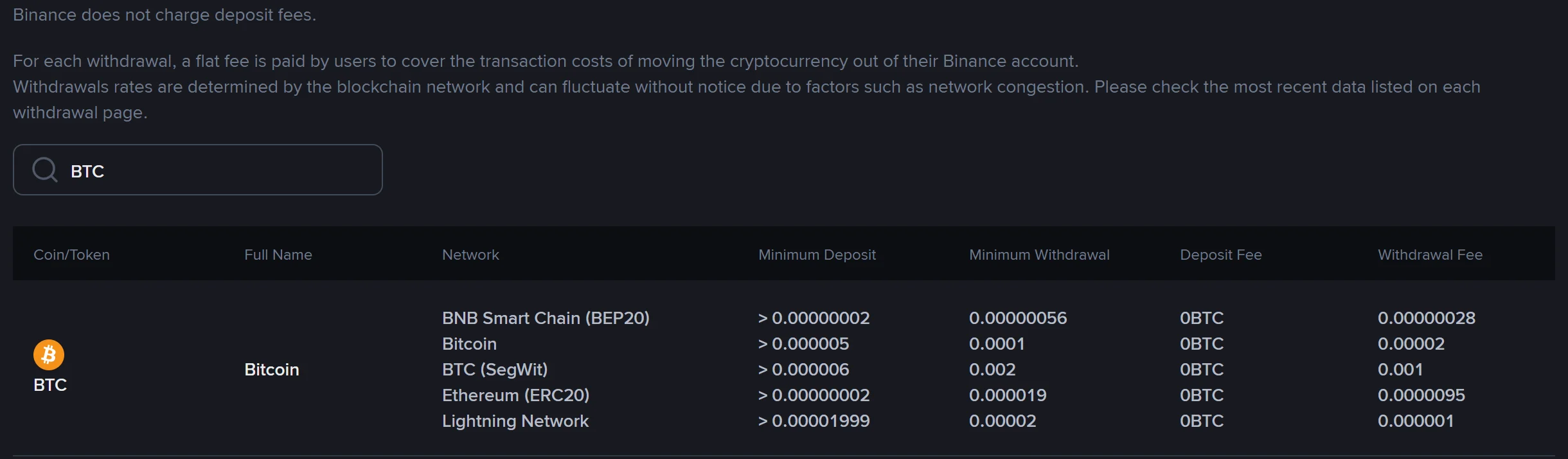
The row named Bitcoin sends native BTC. Check what BTC (SegWit), right below it, charges. Sept 25, 2026.
A few things the table can't show on its own:
You can recheck these without an account. Binance's fee table, Kraken's fees page, and Bitget's coin list are all public. What none of them tells you reliably is whether a route is open on the day: Bitget switched BTC withdrawals off for a while in late September 2026 and had them back on by early October. Only the withdrawal screen in your own account shows that.
28 sats is cheap, but it isn't bitcoin in your wallet. The BNB Smart Chain row sends a BEP-20 token (the contract Binance names ends in ead9c, and on-chain it's called "BTCB Token"). It lands in a BNB Smart Chain address, not a Bitcoin wallet, and turning it back into native BTC means another service and another fee. If your goal is coins in your own Bitcoin wallet, that row doesn't get you there at any price.
Read the network name, not just the coin. The same table has a "BTC (SegWit)" row at 0.001 BTC (100,000 sats) with a 0.002 BTC minimum, fifty times the Bitcoin row. Withdrawals on that row were switched off when we checked in September and October 2026. A menu that mixes rows like this is where careless taps cost money.
Coinbase doesn't publish a flat BTC fee. It charges its estimate of the network fee for a stand-alone send and shows the amount before you confirm. When it batches withdrawals, what Coinbase actually pays can be lower, and its disclosure says the estimated fees users pay in a batch may add up to more than the network fee Coinbase pays. The figure on your send screen is the one to use.
Strike can be free above a threshold. Set a threshold of at least 1,000,000 sats (0.01 BTC) and its auto-withdrawal sends your whole balance on-chain within 24 hours of reaching it, with no fee to you. Below that, compare its manual withdrawal quote instead, and check that the feature is offered where you live.
Fees change without notice. Treat the table as a map of where to look, and the preview in your own account as the real quote.
A better purchase price can lose at withdrawal
Take two providers and the same $100. Provider A credits 100,000 sats. B credits 99,700, because its spread is a little wider. Their on-chain withdrawal fees are 2,000 and 1,500 sats, in line with the table above, and both send native BTC to the same wallet.
| Result | Provider A | Provider B |
|---|---|---|
| BTC credited after buying | 100,000 sats | 99,700 sats |
| Withdrawal fee | 2,000 sats | 1,500 sats |
| Net sats in your wallet | 98,000 sats | 98,200 sats |
Withdraw after every purchase and B wins by 200 sats, even though A had the better price.
Now buy four times and withdraw once. A delivers 400,000 − 2,000 = 398,000 sats. B delivers 398,800 − 1,500 = 397,300 sats. A is ahead by 700, because the withdrawal fee is paid once and the purchase gap four times. Same two providers, opposite order. A fee ranking that doesn't know your purchase amount and your withdrawal plan tells you very little.
Which offers belong in your comparison?
Start with who will actually serve you. An English website isn't evidence that you can open an account, and Binance and Binance.US are separate services with separate terms. A service that won't accept residents of your country, or the ID you hold, is out.
Next, match the destination. If you want native BTC, the BNB Smart Chain row is gone. A Lightning withdrawal can reach a Lightning wallet cheaply, but a later move to cold storage adds another fee, and Lightning vs on-chain withdrawals works through that two-step cost.
Then match the purchase method. A maker fee on an advanced trading screen isn't the price of a recurring buy, and a limit order may never fill. Compare the order type you'll use.
Collect the purchase side yourself
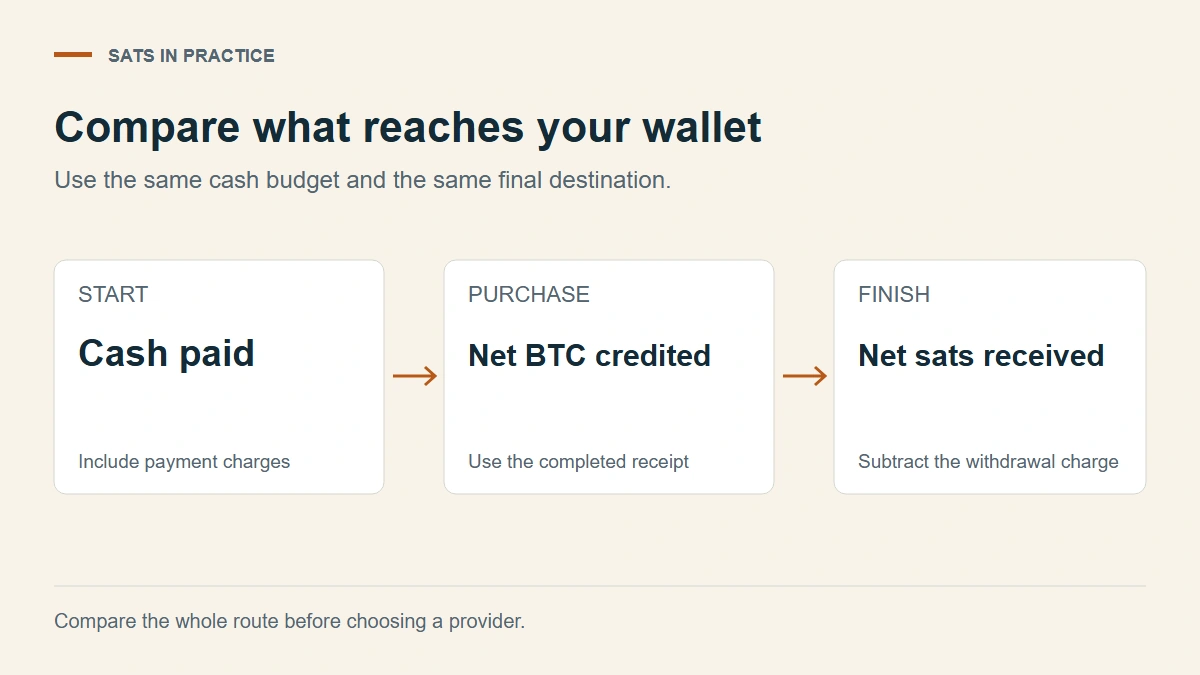
Purchase costs vary too much by country, payment method, and order type for one table to hold them, so gather them from each provider's buy preview. Keep the cash amount, currency, payment method, and withdrawal schedule identical, and collect the quotes close together so a market move doesn't pass for a price difference.
| Field | What belongs here |
|---|---|
| Provider and quote time | Date, time, and time zone |
| Total cash charged | Including bank, card, and conversion costs |
| Net BTC credited | What's left after purchase charges |
| Withdrawal fee and minimum | For the exact network and amount |
| Net sats at your wallet | Credited amount minus the withdrawal fee |
| Earliest withdrawal | Any hold or scheduled processing |
No quote without funding the account? Mark it unavailable. A missing fee isn't zero, and a blank row is no reason to deposit. For each minimum, find out whether it applies to the amount you request or the amount received. Kraken's, for one, includes the fee.
Net sats already reflect every charge. List the individual fees if they help explain the result, but don't subtract them a second time.
Timing, holds, and promotions
A slightly higher net receipt matters less if the funds stay locked past the date you need them. Weigh holds and withdrawal timing against the balance and time limits you're comfortable with. A provider that can't send to your wallet's network is out, whatever its headline fee.
Leave referral rewards and promotions out of the basic comparison. They often come with conditions, the recurring purchase should be affordable without them, and trading more to qualify can undo the saving.
On the withdrawal side alone, for native BTC, the September table ranks them like this. Strike comes first if you can let 0.01 BTC build up. Kraken is next at 1,500 sats. Binance and Bitget tie at 2,000, though Bitget's 50,000-sat minimum is five times Binance's, and its BTC withdrawals were briefly switched off in late September. Coinbase can't be ranked from a table. Your purchase quotes can still reorder that list, as the A-and-B example shows.
If Binance fits, the next step is to create and secure the account before funding it (that guide includes our referral link). Whichever provider you pick, log the first completed purchase next to its quote in a purchase-and-withdrawal spreadsheet, and compare the first withdrawal with what reaches your wallet.