
Backups & Records
Bitcoin DCA Spreadsheet for Google Sheets and Excel
Two sheets and a short formula block track average cost, the exchange balance, wallet receipts, and withdrawal fees in sats, in Google Sheets or Excel.
A Bitcoin DCA spreadsheet has three jobs: show what you've paid per bitcoin on average, show how many sats are still on the exchange, and show how many reached your own wallet. The layout below does that with two sheets and a short summary block, and the formulas work in both Google Sheets and Excel. One rule keeps the totals right. Moving bitcoin from an exchange to your wallet is a transfer, not another purchase, so each fee gets counted once.
It doesn't calculate taxes. Keep whatever acquisition records the rules where you live require.
The two sheets to create
Make two CSV files or two sheets, named Purchases and Withdrawals. The headers contain no secrets and work with ordinary spreadsheet tools.
timestamp,provider,order_reference,cash_total,currency,net_btc_sats,purchase_fee_amount,purchase_fee_currency,fee_already_reflected_in_cash_total,fee_already_reflected_in_net_btc,receipt_location
timestamp,provider,withdrawal_reference,network,total_debit_sats,fee_amount,fee_currency,fee_included_in_total_debit,net_received_sats,transaction_id,destination_label,status
Paste each header row into cell A1, and the columns the formulas rely on land here:
| Sheet | Column | Header |
|---|---|---|
| Purchases | D | cash_total |
| Purchases | E | currency |
| Purchases | F | net_btc_sats |
| Withdrawals | E | total_debit_sats |
| Withdrawals | F | fee_amount |
| Withdrawals | G | fee_currency |
| Withdrawals | I | net_received_sats |
| Withdrawals | L | status |
status takes two words only, pending and confirmed, so the formulas can count them. Store transaction IDs as text (where Binance and your wallet show them) and put the time zone in every date so imports don't change their meaning. Receipt links stay private, and wallet or account secrets stay out of the workbook.
Amounts and fees: keep the units explicit
Use integer sats where you can. One BTC equals 100,000,000 sats, so 0.00025000 BTC becomes 25,000 sats. The original BTC figure can stay on your source receipt. Just don't mix decimal BTC and integer sats in the same numeric column.
For a purchase, cash_total is the full cash debit including any fiat fee, and net_btc_sats is the bitcoin actually credited after any fee taken in BTC. Neither needs the fee added or subtracted again.
For a BTC withdrawal fee that's included in the debit, the identity is:
total_debit_sats = net_received_sats + fee_sats
The exchange balance drops once, by total_debit_sats. The fee explains the gap and isn't subtracted a second time. A fee charged in cash or another asset stays out of this identity.
Four purchases, then one withdrawal
Four purchases, each crediting 25,000 sats after costs, take an empty exchange balance to 100,000 sats.
Now withdraw with a total debit of 100,000 sats, including a 2,000-sat fee. Your wallet receives 98,000 sats. That fee is what Binance's fee page listed for a BTC withdrawal on the Bitcoin network when we checked in September 2026.
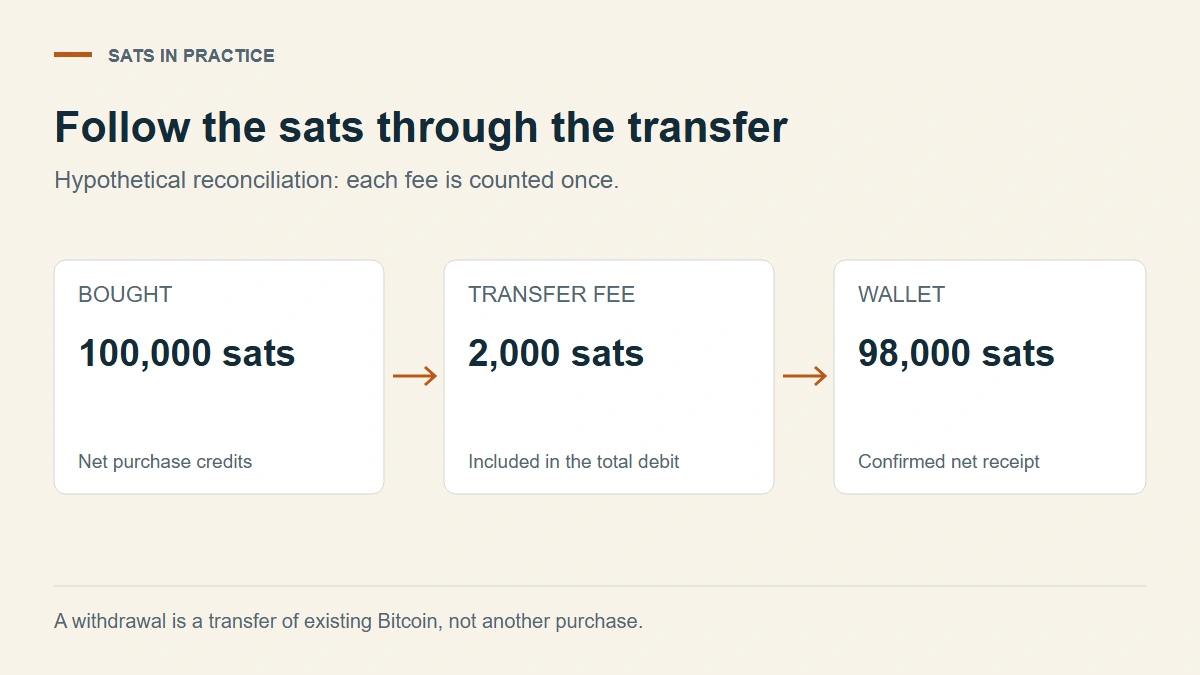
The fee sits inside the 100,000-sat debit, not on top of it.
| Event | Exchange BTC change | Wallet BTC change | BTC fee |
|---|---|---|---|
| Four purchases, combined here to save space | +100,000 sats | 0 | Already reflected in net purchase credits |
| Withdrawal | −100,000 sats | +98,000 sats | 2,000 sats |
| Closing balance | 0 | 98,000 sats | 2,000 sats for this transfer |
Across the two locations, your BTC fell from 100,000 to 98,000 because of the transfer charge. In your real ledger, keep the four purchase rows separate.
However the platform labels it, record the row as total_debit_sats=100000, fee_amount=0.00002000, fee_currency=BTC, fee_included_in_total_debit=true, and net_received_sats=98000. A separate cash fee goes in fee_amount and fee_currency, with total_debit_sats still the BTC balance change.
Formulas to paste
Add a third sheet called Summary. Type your opening exchange balance in sats into B1 (0 if you started from zero), then paste these into B2 to B10:
B2   =SUMIF(Purchases!E:E,"USD",Purchases!D:D)/(SUMIF(Purchases!E:E,"USD",Purchases!F:F)/100000000)
B3   =B1+SUM(Purchases!F:F)-SUM(Withdrawals!E:E)
B4   =SUMIF(Withdrawals!L:L,"confirmed",Withdrawals!I:I)
B5   =SUMIF(Withdrawals!L:L,"pending",Withdrawals!I:I)
B6   =ROUND(SUMIF(Withdrawals!G:G,"BTC",Withdrawals!F:F)*100000000,0)
B7   =SUM(Withdrawals!E:E)-SUM(Withdrawals!I:I)-B6
B8   (bitcoin price in USD, see below)
B9   =(B3+B4+B5)/100000000*B8
B10  =SUMIF(Purchases!E:E,"USD",Purchases!D:D)/((B3+B4+B5)/100000000)
- B2 is your average cost per BTC: USD spent divided by BTC credited. Buy in another currency? Change "USD".
- B3 is the exchange balance in sats. Deposits of BTC to the exchange, or sales, get their own columns and belong here too.
- B4 is what has arrived in your wallet, and B5 is what's still on its way.
- B6 totals BTC withdrawal fees in sats. With the worked example it shows 2,000.
- B7 is the check cell, and the one to glance at every time you add a row. When every BTC fee is included in its debit, it reads 0. Anything else points at a row where the identity above doesn't hold. To find that row, type
checkin M1 of Withdrawals, paste=E2-I2-IF(G2="BTC",ROUND(F2*100000000,0),0)into M2, and fill it down. Any row that doesn't show 0 is the one to fix. - B9 values everything you hold at the price in B8.
- B10 is the cost per BTC you actually hold. It sits a little above B2 because withdrawal fees took some sats away. Those fees aren't a second purchase, so they get no rows in Purchases.
For the price in B8, Google Sheets users can try =GOOGLEFINANCE("CURRENCY:BTCUSD"). It isn't documented: Google's GOOGLEFINANCE reference doesn't list crypto pairs, and the form comes from CoinGecko's Google Sheets guide. Google says quotes can be delayed by up to 20 minutes. If the cell shows #N/A, type the price in by hand.
Excel for Microsoft 365 has a Currencies data type that fetches exchange rates for pairs written with ISO currency codes, such as USD/EUR. Bitcoin isn't mentioned on Microsoft's help page, so it's worth a try, nothing more: type BTC/USD in a cell and choose Data → Currencies. If the cell converts, use Insert Data → Price and point B8 at that cell. If it shows an error icon, or you're on an older Excel, type the price manually.
Typing it by hand is fine. B8 feeds only the value in B9, never the cost figures in B2 or B10.
When the spreadsheet and exchange disagree
For a period with only buys, deposits, and withdrawals, use:
Closing exchange BTC = opening BTC + net purchase credits + BTC deposits − total withdrawal debits
Add categories if you also sold BTC, paid a fee from another balance, or received an adjustment.
If the result doesn't match, calculate difference = ledger closing sats − exchange statement closing sats for the same account and cutoff time. Compare total BTC holdings, not just the amount available to withdraw. A settlement hold can reduce availability without removing any BTC.
Then check the records one step at a time:
- Check that the opening balance and the export cover the same period and time zone. Remove a row only when the fill or transaction ID, timestamp, amount, and status show it's an exact duplicate. An order reference alone isn't proof, because separate partial fills can share one order.
- Match each purchase credit and withdrawal debit to its completed receipt. Keep pending items separate and confirm that every page of the export is included. On Binance's website, the export sits under Assets > Asset History, behind Export Transaction Records. The download link expires after 7 days and the number of statements per month is limited, so save each file when it's ready (Binance's guide).
- Check fee units and whether a fee was already included. In the worked example, subtracting the 2,000-sat fee again produces a false closing balance of −2,000 sats instead of zero. A difference of the same size is a clue, not proof.
- If one completed debit still disagrees with its receipt, keep the opening balance, cutoff time, reference, receipt, and exact difference in sats, and send that limited evidence to the provider's support. Don't change the opening balance to force the sheet to match.
If the exchange side reconciles but a wallet receipt is missing, the withdrawal status checks separate platform processing, an unconfirmed transaction, and a wallet-display issue. Mark the row pending with a note of the next check instead of entering a made-up balancing transaction.
Reconcile in sats first and dollars last. Two screens can price the same number of sats at different timestamps.
Following the bitcoin after it reaches your wallet
The wallet's confirmed balance should agree with its confirmed unspent outputs. A payment splits into the recipient amount, the change returned to you, and the miner fee, while a consolidation to your own wallet reduces the balance by the miner fee alone. Keep a link between the old output identifiers and the new transaction. From an account's overview, Trezor Suite exports its transaction list as CSV, PDF, or JSON (transaction-history guide), which gives you TXIDs and times to match against the Withdrawals sheet. Inputs and outputs are laid out in Bitcoin's transaction documentation, and Trezor's change guide shows how unused value comes back.
A UTXO isn't a purchase lot. One withdrawal may carry several purchases, so keep the purchase rows rather than trying to rebuild them from the current UTXO list.
At month-end, match the cash charged to settled bank or card entries, then compare the exchange balance and each wallet receipt. Update a pending row when it completes instead of adding a new one, and if the exchange replaces a transaction, keep both IDs on the same row. In the worked example, the finished sheet shows zero on the exchange and 98,000 sats in the wallet, with the 2,000-sat difference explained once, in B6.
Handing the sheet to a tax preparer
The sheet doesn't decide how anything is taxed, but it holds most of what a preparer will ask for. For US taxpayers, the IRS digital assets page asks you to keep records of each purchase, receipt, sale, exchange, or other disposition, and to know the date and time, number of units, dollar value, and basis of anything you dispose of. Brokers report gross proceeds on Form 1099-DA for transactions from January 1, 2025, and basis only for certain transactions from January 1, 2026. Before filing, you calculate basis yourself, and that's where the Purchases rows earn their place. If a 1099-DA looks wrong, ask the issuer named in its Filer box for a corrected form. The IRS says it can't correct one.
For each tax year, hand over the Purchases and Withdrawals sheets, each provider's own export for the same dates, your wallet's transaction export, and any 1099-DA. Questions such as how withdrawal fees are treated, or which purchases a later sale used, belong with a tax preparer or your tax authority's own guidance, such as HMRC's Cryptoassets Manual in the UK.