
Withdrawals
Bitcoin Withdrawal Not Received? 3 Places It Can Be Stuck
Blocks come about every 10 minutes. If a withdrawal still hasn't arrived, the TXID shows whether it's stuck at the exchange, unconfirmed, or confirmed but not showing.
A withdrawal that hasn't shown up after 15 minutes is usually just waiting its turn. Bitcoin blocks arrive about every 10 minutes on average, and many wallets mark an incoming payment as confirmed once the first block includes it. If an hour has passed, or the exchange says "completed" and your wallet shows nothing, find out where it stopped.
There are three places an on-chain withdrawal can stall. The exchange hasn't broadcast it. It's broadcast but unconfirmed. Or it's confirmed and your wallet isn't showing it. Each has its own fix, and none of them needs your recovery words, private keys, or 2FA codes.
Find the withdrawal and its transaction ID
Open the withdrawal record on the exchange's website or app. Check the network. Then look for a Bitcoin transaction ID (TXID), a 64-character string that differs from the exchange's internal withdrawal number. If the record says Lightning or names another blockchain, skip to the last section.
Paste the TXID into a Bitcoin explorer such as mempool.space and make sure it's set to Bitcoin mainnet. The lookup shares the TXID with that site. If you run your own node or explorer, use that instead.
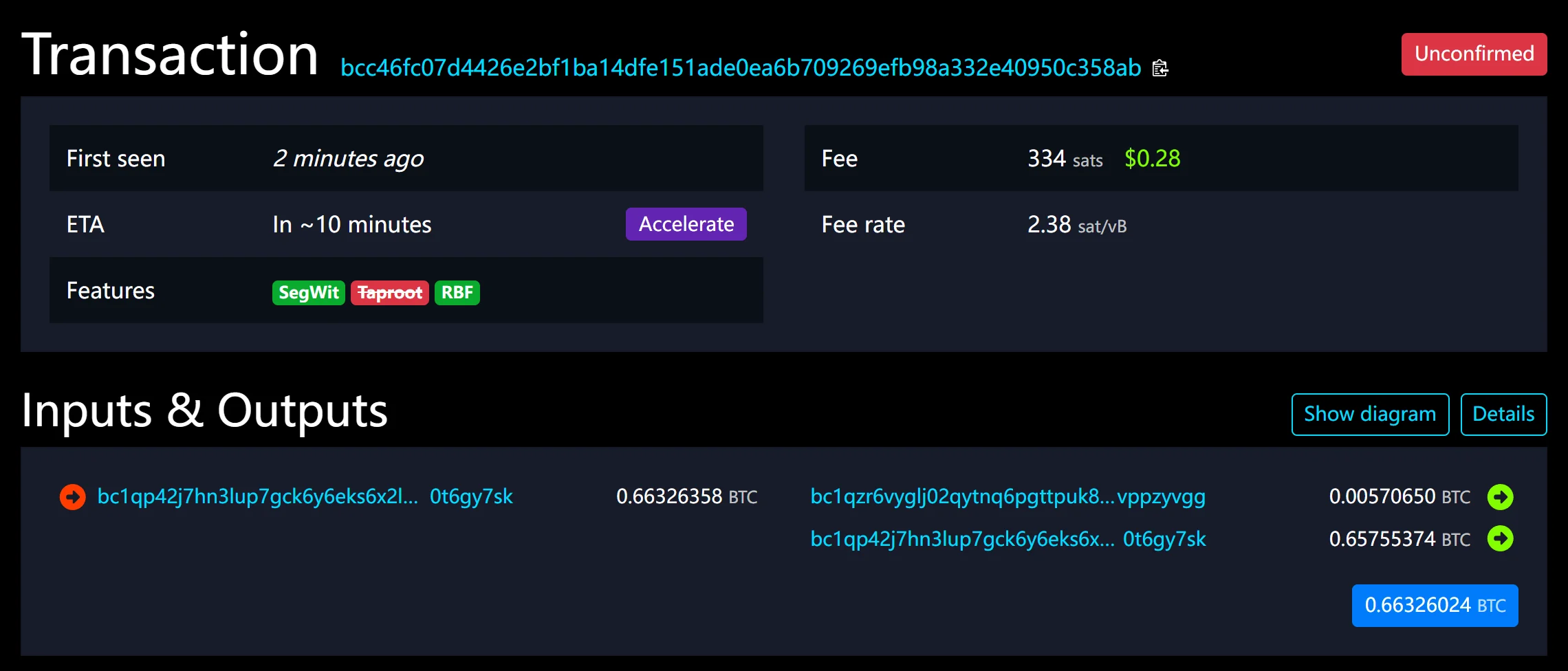
A stranger's transaction, still unconfirmed on Sept 25, 2026. Ignore the purple Accelerate button. It's mempool.space's own paid service, has nothing to do with any exchange, and you don't need it to receive a payment.
What to read on a page like this:
- Status badge. "Unconfirmed" in red, or a green count such as "1 confirmation".
- First seen. How long the explorer has known about the transaction. Hours here means it really is waiting.
- ETA. An estimate based on the current queue. It shifts as new transactions arrive.
- Fee rate. The figure you will compare in Stage 2. Here it is 2.38 sat/vB.
- RBF. A green tag means the sender can replace the transaction with a higher-fee version. A struck-through tag means it did not opt in.
- Outputs. Find the row with your address and check the amount.
Explorer can't find the TXID? Check that you copied all of it, then try a second explorer. Nodes don't all hold the same unconfirmed transactions; one empty search doesn't mean the coins are gone.
Then take the branch that matches what you found:
- The withdrawal record shows no TXID: Stage 1.
- The explorer shows "Unconfirmed": Stage 2.
- The explorer shows 1 confirmation or more: Stage 3.
Stage 1: No TXID in the withdrawal record
No TXID means the transaction isn't on the Bitcoin network yet. No miner or accelerator can help with that. Match what the exchange shows instead. On Binance's website, withdrawals are listed under Overview → Orders → Assets History → Withdraw, with a Status column:
- Status "Processing," under 30 minutes since you submitted: normal. We opened Binance's withdrawal FAQ in September 2026, and it gave 1 to 30 minutes as the usual wait for a TXID.
- Still no TXID after 6 hours: contact support, and attach a screenshot of your withdrawal history.
- "Your withdrawal may be at risk. You can try again in 24 hours": the withdrawal is under review and the result comes by email (Binance's page on suspended withdrawals). The 48-hour version of the message can't be lifted early.
- No record at all, because withdrawals were blocked after you changed your password or another security setting: withdrawals pause for 24 to 48 hours after a change like that. Only time lifts the pause.
Other exchanges use their own labels. Check the status page and any notice on your account, and contact support once the stated processing time has passed. Holds differ by provider too. At Coinbase, recently bought funds can be tradable but not yet transferable, and its available-balance FAQ explains why.
In the 2026 fee environment, this is the likelier place for a withdrawal to be stuck. On September 25, 2026, mempool.space's high-priority (next-block) estimate was about 2 sat/vB. At that level an exchange-built transaction seldom waits long once it is out. A missing TXID points to the exchange, not the network.
Do not cancel and resubmit unless the exchange offers a cancel option and shows the original request as canceled. Otherwise you risk sending two withdrawals.
Stage 2: Broadcast but unconfirmed
Compare the transaction's fee rate with the Transaction Fees panel on the mempool.space homepage. Its High, Medium, and Low priority rates aim at roughly the next block, half an hour, and an hour. No priority is its lowest suggestion, for transactions that can wait.
- At or above Low priority: the transaction is most likely just waiting for blocks. Give it an hour or two before acting.
- Well below No priority, or under 1 sat/vB: it may wait much longer. Some nodes still reject rates under 1 sat/vB, so it may not reach every miner.
The one in the screenshot paid 2.38 sat/vB while mempool.space's High priority rate was 2. A block within minutes was a fair bet. For recent rate history, see what sat/vB means in practice.
On an exchange withdrawal, the inputs belong to the exchange. Your receiving wallet can't rewrite the transaction with Replace-by-Fee. Ask the exchange whether it bumps fees on pending withdrawals.
Sent it from your own wallet, and it carries the RBF tag? Then you can replace it with a higher-fee version. In Sparrow, open the Transactions screen, right-click the unconfirmed transaction, and choose Increase Fee (the conditions are in Sparrow's FAQ). Trezor Suite has the same step, shown in Trezor's RBF guide. Review the new fee and outputs before signing: a replacement pays the recipient once, not twice.
Why is my Bitcoin transaction unconfirmed for hours?
Usually for one of these reasons:
- The rate fell behind. More transactions arrived after yours, and miners fill blocks with the highest rates first.
- It sits under a relay floor. A very low rate may reach only part of the network.
- It depends on another unconfirmed transaction. If it spends coins from a parent that has not confirmed either, both wait together. The explorer shows the parent under Inputs.
- Blocks were slow. Block intervals are random, and an hour without a block is uncommon but not unheard of.
After about two weeks unconfirmed, a transaction can drop out of node memory pools. By default, Bitcoin Core nodes drop a transaction that has sat unconfirmed for 336 hours, which is 14 days.
Dropped does not mean lost.
A transaction confirms completely or not at all. The coins never left the sender's inputs, and the sender can broadcast it again or replace it. For an exchange withdrawal, wait for the exchange to show a new TXID or a refund.
Can the receiving wallet speed it up?
Sometimes. Child Pays for Parent (CPFP) means spending your unconfirmed output in a new transaction whose fee is high enough for miners to take both (Bitcoin Optech's CPFP page has the mechanics). In Sparrow's terms, you spend the transaction's outputs at a higher fee rate. The catch is that the child has to lift the whole package. Behind a large exchange batch, that can cost more than a small receipt is worth. Unless your wallet shows the package fee before you sign, wait or ask the sender.
The Accelerate button is mempool.space's paid service, Mempool Accelerator, run by the explorer and not by any exchange. Go to the wallet or exchange that made the transaction first. For an exchange withdrawal that's the right order, because the exchange can bump or rebroadcast at no cost to you. Still thinking of paying? Read the quote and terms on mempool.space itself.
Anyone who messages you offering to "accelerate," "unlock," or "synchronize" a transaction is not that service.
Stage 3: Bitcoin confirmed but not received in your wallet
Compare the output in the block with the exact address you generated for this withdrawal. The address and the amount should both match.
Withdrew to another exchange? It credits the deposit after its own confirmation count. At Binance, going by its public network data, a BTC deposit appears after 1 confirmation and can be withdrawn again after 2. Past that count and still not credited, the receiving exchange is the one that can fix it, not the sender. Give its support the TXID. Binance has a self-service recovery form for confirmed deposits that haven't arrived after an hour.
In a personal wallet, four checks. Is it on mainnet, not testnet? Is the open account the one that generated the address? Some wallets keep a separate account for each address type. Has it synced with its server or node? And are you in the right passphrase wallet? A passphrase opens a separate wallet, even on the same device.
Do not uninstall, wipe, or restore the wallet as a first step. That adds recovery risk and changes nothing on the blockchain.
If the destination is an address you control and the wallet still shows nothing, that's one for the wallet's documentation and support. A smaller miner fee on the explorer than you were charged is normal for batched withdrawals and has its own explanation.
If the coins went to an unfamiliar address
Work through these in order, and hold off on any new withdrawal meanwhile:
- Rule out your own wallets. Search for the address in every account of your wallet app, any passphrase wallet, older wallets, and the exchange's saved address list. If it turns up, the coins are yours and sitting in that account.
- Compare the exchange record with the explorer. If the record shows the address you entered but the coins went elsewhere, that is for the exchange to explain. Take the record and the TXID to its support.
- If the record shows the wrong address and you pasted it, the change happened on your side of the form. A slip is possible. So is clipboard malware. Microsoft described one in June 2026 that swaps a copied Bitcoin address for the attacker's own. It matches the first two characters of addresses starting with 1 or 3 and works on the last character of bc1q and bc1p addresses, so checking only the ends of an address won't catch it. Stop using that computer for bitcoin until it has been cleaned. Generate and verify the next address on another device, and send a small test first.
- Know the limit. A confirmed transaction can't be reversed. Binance can't help once the funds have left (wrong-address FAQ). What's left is the owner of the address, if you know who that is, or the support of the platform the address belongs to. If neither applies, the coins are gone.
What to send support
Give the network, withdrawal reference, date and time with time zone, expected amount, TXID, and the exact status shown. Say which stage you are in and whether the destination matches your saved address. Use the provider's official support pages, not a reply on social media. Genuine support never needs recovery words, a private key, or a remote-control session.
If support does not resolve it
Keep the case in writing, inside the provider's own channels. At Binance, that means the Binance Support icon on the website (Support in the app), then Get Support and Customer Service to reach a person. Answer an agent within 24 hours to keep your place in the queue. A thread marked "Solved" reopens if you reply to it (support guide).
If chat doesn't settle it, file a formal complaint through the Support Center or live chat. Binance's complaint procedure promises a written acknowledgment with a reference number within two business days, and aims for a final response within 30 business days, 60 at most. Once that process is exhausted, it names its regulator for events from January 5, 2026 onward: the Financial Services Regulatory Authority (FSRA) of Abu Dhabi Global Market. The FSRA, though, says it doesn't adjudicate disputes or act as an appeals body. Other exchanges have their own complaint procedures. Search their help centers for "complaint" and look for the escalation step.
How far to push depends on where the coins are. With no TXID, they never left the exchange's books, and that case is worth pushing to the end. A confirmed transaction to an address nobody will answer for can't be undone by any complaint. In both cases, never pay a "recovery" service. The FTC's recovery scam warning is blunt: anyone who asks for an upfront fee to get your money back is a scammer.
If the record says Lightning or another network
Lightning: A Bitcoin block explorer will not show it. Use the exchange's payment record and your wallet's Lightning history, and note the withdrawal reference, invoice or payment hash, amount in sats, status, and any error. A Lightning payment either settles in full or fails back to the sender. It can't half-arrive. So:
- Your wallet lists it as received: it arrived, whatever the exchange's status says.
- Still pending: a payment stuck along its route eventually times out and fails, which can take a few hours or a few days (Phoenix's FAQ). Keep the receiving wallet open and online meanwhile. Sends from Coinbase to some self-custody wallets can also take hours or fail (Coinbase's Lightning guide).
- Failed, but your balance is still short: a sending service can take a while to notice a failure and credit the funds back, so check the balance again later. If the record says failed and the amount hasn't returned, send support the invoice, the payment hash, and the status. If the exchange says the payment went through, ask for its preimage. The recipient releases it only on receiving the funds, so it proves the invoice was paid.
An expired invoice alone does not prove the payment failed or was refunded. Do not pay a new invoice while the first is unresolved.
Another blockchain: A record that names a token network such as BNB Smart Chain or Ethereum means the transaction is on that chain, not Bitcoin, and a Bitcoin explorer won't find it. Save the network, TXID, asset, and destination. What happens next depends on who holds the keys to the receiving address. At Binance, those two rows only accept an address starting with 0x, so that is where the token went:
- A
0xaddress in your own wallet, such as MetaMask or the Ethereum account of a hardware wallet: the token is there. Add BNB Smart Chain to that wallet to see it (Binance's guide to recovering BEP-20 tokens), and keep a little BNB to pay gas. To get back to native BTC, deposit the token to Binance on the same network, then withdraw on the Bitcoin network. Binance's deposit notice accepts BTC on BNB Smart Chain only when the token contract ends inead9c, the same token its withdrawals on that network send. The Ethereum row works the same way with ETH for gas and a contract ending in22541. - A deposit address at another exchange: only that exchange can credit or return it. Give its support the TXID, network, and amount, and ask whether it recovers deposits of that token.
- An address you don't control: Binance can't retrieve it, and only the owner can send it back.
Sending more as a test won't bring anything back. For next time, how to pick the route starts from what your wallet's Receive screen shows.