
UTXO Management
Why Does My Bitcoin Address Change, and Can I Reuse an Old One?
Wallets show a new address for privacy, but old addresses still receive. Reusing one doesn't merge UTXOs or cut fees; it only makes payments easier to link.
Your wallet shows a new address after each payment because it's built to. A modern Bitcoin wallet derives a long sequence of addresses from one backup and moves to the next unused one, so each payer sees a different address. The old ones don't expire: send to an earlier address and the coins still land in the same wallet. What reuse won't do is save you anything on fees.
Why the address keeps changing
Self-custody wallets such as Trezor Suite and Sparrow are hierarchical deterministic (HD) wallets. Every key and address is generated from your recovery words in a fixed order, so the same backup always produces the same accounts and addresses (Trezor's address guide). Your balance is the total across all of them. A new address on screen is not a new wallet.
The reason for moving on is privacy. Bitcoin's transaction history is public, so anyone who has paid an address can look it up and see every other payment it received and when those coins moved. A fresh address per payment removes that obvious link, and that's why Trezor Suite hands you a new receiving address every time.
Can I still receive Bitcoin to an old address?
Usually, yes.
Trezor's receiving guide still said so in September 2026: reusing an old address works, though a new one per payment keeps your funds harder to link. The payment arrives as long as three things hold.
It's the same wallet and account. The address has to come from the recovery words you're using now, with the same passphrase if you use one. If an old address starts with a different prefix from your current ones (1, 3, bc1q, or bc1p), it probably belongs to a different account type in the same wallet, and you may need to add that account to see the funds.
The wallet is scanning far enough. HD wallets can't search forever, so they stop after a run of unused addresses. BIP44 sets this "gap limit" at 20: after 20 unused addresses in a row, the wallet assumes there's nothing beyond. Trezor Suite follows it, which is why it will only hand out 20 unused addresses ahead. This bites mainly if you've given out lots of addresses that never received anything, or restored the backup in a different app. Payments past the gap aren't lost. The wallet just isn't looking there. In Sparrow, raise the gap limit under Settings > Advanced (Sparrow's FAQ).
It isn't an exchange deposit address. Those belong to the exchange, not your wallet, and the exchange decides whether an old one still credits your account. Check the deposit page before reusing one.
Paid to an old address but the wallet shows nothing
Start at step 1 and stop at the first step that explains it:
- Look the address up on mempool.space. An unconfirmed payment isn't a wallet problem yet, so the pending-payment checks apply. If it's confirmed, note the TXID and amount.
- Find the address in your wallet. In Sparrow, the Addresses tab lists every receive address. Not listed under your Bitcoin account? Then you're most likely in a different wallet, account type, or passphrase wallet (Trezor's troubleshooting page).
- Open the matching account. Match the prefix to its type and add that account. In Trezor Suite on desktop, click the plus icon next to Accounts. In the mobile app, choose Change address type while adding a Bitcoin account. Check that Bitcoin is switched on under Settings > Networks, and open the passphrase wallet if the payment went there (Trezor's checklist).
- Look past the gap. Trezor Suite won't hand out more than 20 unused addresses, so a payment beyond the gap usually means another app using the same backup gave out the address. Sparrow can look further: in Settings, click Advanced, raise the gap limit, then click Close and Apply. A Trezor can be imported into Sparrow as a connected hardware wallet for this, without entering its recovery words.
- If it's in none of them, the address came from a different backup, such as an older wallet, or it's an exchange deposit address. Find that wallet's backup, or send the exchange the TXID, the address, the amount, and the time.
Don't wipe or restore your device to go looking for it, and don't give your recovery words to anyone offering to find the coins. Addresses can't disappear. The coins are still at that address, controlled by whichever keys created it.
What is a change address?
Change is the other reason addresses seem to shift. Bitcoin spends each selected UTXO in full, and whatever is left after the payment and fee comes back to you at a new address the wallet controls. HD wallets keep these on a separate "change" chain, apart from the addresses you hand out.
Spend a 200,000-sat UTXO on a 60,000-sat payment and it splits like this:
| Destination | Amount |
|---|---|
| Recipient | 60,000 sats |
| Change, to a new address in your wallet | 139,000 sats |
| Miner fee | 1,000 sats |
| Total | 200,000 sats |
Look up the old address on an explorer afterward and it may show zero. It looks alarming and isn't. The 139,000 sats are sitting at the change address, and Trezor's change-address explainer walks through the same surprise. Sending the change back to the old address to "restore" its balance only adds a transaction and a fee.
Does reusing an address lower fees?
No. Reusing a Bitcoin address doesn't merge the payments sent to it. Three withdrawals of 80,000 sats to one address create three separate UTXOs, exactly as they would at three fresh addresses in the same wallet.
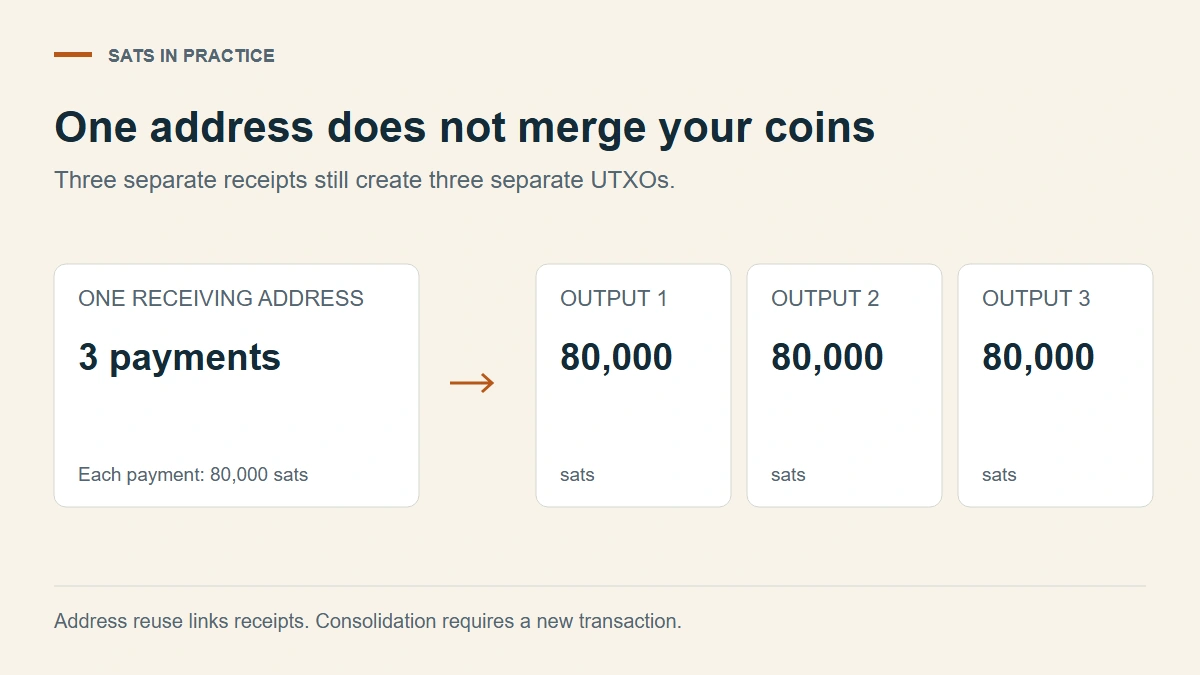
A later payment that spends all three needs three inputs either way. The fee depends on the transaction's size in vB and the fee rate, not on whether those inputs share an address. Only a transaction that spends several UTXOs and creates one new output combines them, and that costs a fee now. The consolidation break-even calculation shows when it's worth it.
What reuse gives away
Reuse costs privacy and buys you nothing, so we'd take the fresh address every time. Whoever pays a reused address can see your other receipts there and follow them when you spend. An exchange already knows the withdrawal address you gave it. Reuse that address, and anyone who spots one of those withdrawals can find all the others. Tiny unsolicited payments are easier to aim at a known address too, and the dust guide explains why you shouldn't spend them with your other coins.
Fresh addresses won't make you anonymous (Bitcoin.org's privacy guidance covers the limits). They just remove the easiest link, and for one extra click per withdrawal that's a good trade.
How to check whether you've reused addresses
In Sparrow: open the Addresses tab, which lists receive and change addresses separately. Right-click any column header and tick Show Transaction Count. The Transactions column then shows how many outputs each address has received, and any receive address above 1 has been reused. Expand a row to see the individual outputs.
Anywhere else: copy an old receive address from the wallet and search it on a block explorer such as mempool.space, which lists every transaction that paid it. The catch is that the explorer's operator can see which addresses you look up.
Found some reuse? Nothing needs fixing urgently. You don't have to move coins just to empty an old address. Use a fresh address for each new receipt from here on, and decide how to spend the existing UTXOs on fee and privacy grounds.