
UTXO Management
Why Is Bitcoin So Expensive to Send From My Wallet?
A high send fee from your own wallet usually means a higher rate than needed, an old address type, or many small coins. The unsigned preview tells you which.
Start by ruling out the network. The median block fee rate has sat around 1 sat/vB every month since September 2025, and on September 25, 2026, mempool.space suggested 0.5 sat/vB for a send that could wait about an hour. At that rate a simple one-input payment costs roughly 70 sats.
So when your own wallet quotes a fee that looks high, look closer to home. There are three usual suspects: the wallet picked a rate higher than you needed, your coins sit on an old address type, or the payment has to spend many small coins.
This page covers sends from a wallet you control. If the number came from an exchange's withdrawal screen, it's a price the exchange sets, and a different explanation applies.
Rate or size? Read the preview first
The fee is the rate multiplied by the transaction's size: fee in sats = sat/vB × vB. Build an unsigned send preview and find both numbers. What sat/vB means covers the arithmetic and how to find the size if your wallet hides it.
- Rate well above mempool.space's current Low or Medium priority, size normal (about 110 to 230 vB for one input, depending on address type): the rate is the problem.
- Rate normal, size large: look at the inputs and their address type.
- Both high: fix the size first. Every sat/vB you save is multiplied by it.
Cause 1: The wallet chose a higher rate than the moment needs
The rate in your preview comes from the wallet's own estimator and default priority, and some wallets won't go below 1 sat/vB at all. Test it against the mempool.space panel. Wallet showing only a total fee and a size? Divide one by the other. 423 sats for a 141-vB payment is 3 sat/vB, several times what an hour's wait needed on a day like September 25, 2026. Many wallets and older nodes still hold a 1 sat/vB relay floor. That's a rule, not a mistake; on a quiet day, though, it can mean paying twice what the queue needs.
On a 141-vB payment, the difference between 2 sat/vB and 0.5 sat/vB is about 210 sats, under 20 cents at $84,000 per BTC.
Of the three suspects, the rate is usually the cheap one. It starts to hurt when it's multiplied by a large transaction.
If the payment isn't urgent, switch to a lower priority or a custom rate, check it against the mempool.space fee panel, and stay at or above whatever floor your wallet enforces. A wallet with only fixed tiers? Take the lowest one that fits your deadline. On a one-input payment the tiers differ by cents, so changing wallets pays off only for large transactions. And if a low-rate send then sits unconfirmed longer than you can wait, raise its fee instead of sending the payment a second time.
Cause 2: Your coins sit on an old address type
The address that received your coins sets the size of every input that spends them. A legacy input (address starting with 1) is 148 vB. A native SegWit input (bc1q) is 68 vB, going by Bitcoin Optech's size calculator, so the old type takes about 2.2 times the space.
Here's the same payment, five inputs and two outputs, with every address of one type:
| Address type | Approximate size | Fee at 1 sat/vB | Fee at 10 sat/vB |
|---|---|---|---|
| Legacy (1…) | 818 vB | 818 sats | 8,180 sats |
| Nested SegWit (3…) | about 528 vB | about 528 sats | about 5,280 sats |
| Native SegWit (bc1q…) | about 413 vB | about 413 sats | about 4,130 sats |
| Taproot (bc1p…) | 384 vB | 384 sats | 3,840 sats |
Sizes use Optech's per-type figures, with Jameson Lopp's calculator for the nested SegWit input (about 91 vB). The full size table lists inputs and outputs separately.
You can't change the address type of coins you already hold. Future purchases and withdrawals are another matter: receive them to a bc1q or bc1p address whenever the sender supports it. Old coins can move to one of your own new addresses while fees are low. That's a consolidation, and the break-even arithmetic tells you whether it pays.
Cause 3: The payment needs many small coins
A UTXO is one unspent transaction output. Your balance is the sum of all of them, not one coin that grows. Five payments to the same address create five UTXOs. Ten purchases inside an exchange account create no outputs in your wallet until you withdraw, and one withdrawal usually gives you one UTXO.
When a payment needs several UTXOs, each becomes an input. At 68 vB per bc1q input, twenty coins add 1,292 vB compared with spending one coin of the same total value.
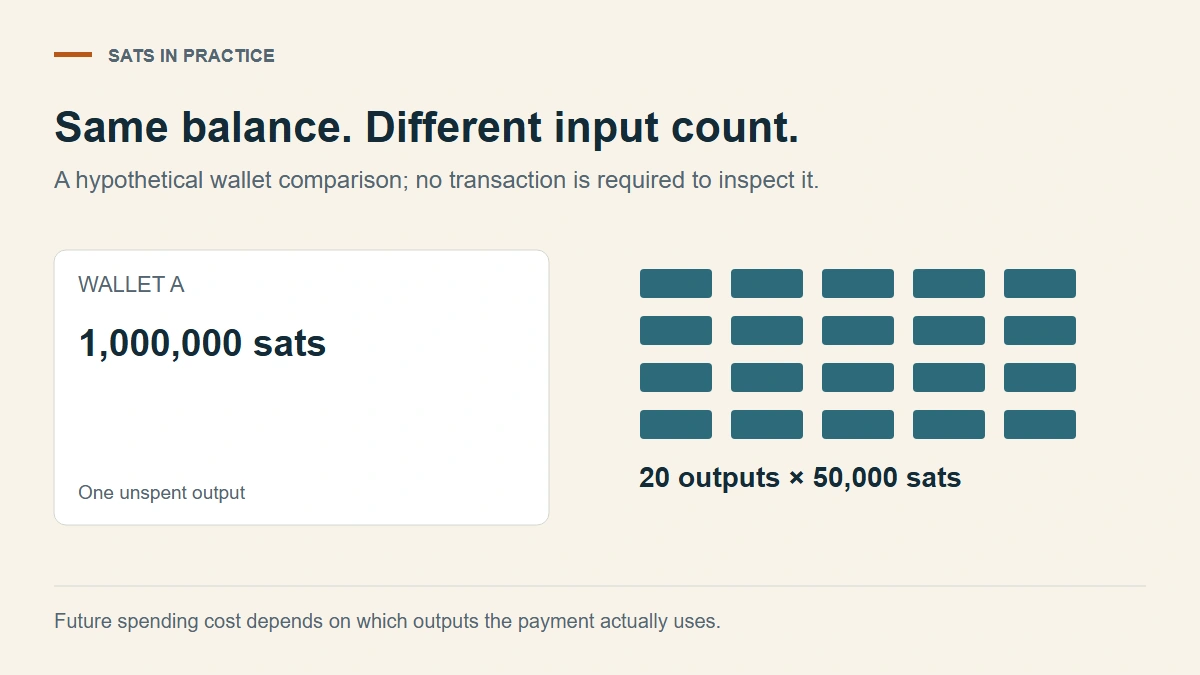
Same balance, different input counts. Spending all twenty takes about ten to thirteen times the block space of spending the single coin, depending on whether there's change.
A smaller payment might need only a few of those twenty coins, so check which ones the preview actually selected. For single coins so small that spending them costs a large share of their value, see what a small UTXO costs to spend.
Inspect the coins without spending them
If you already use Sparrow for this wallet, open the UTXOs screen just above Settings. Each row is one output, and you can look without selecting anything or pressing Send Selected. We checked that route against Sparrow's coin-control FAQ in September 2026.
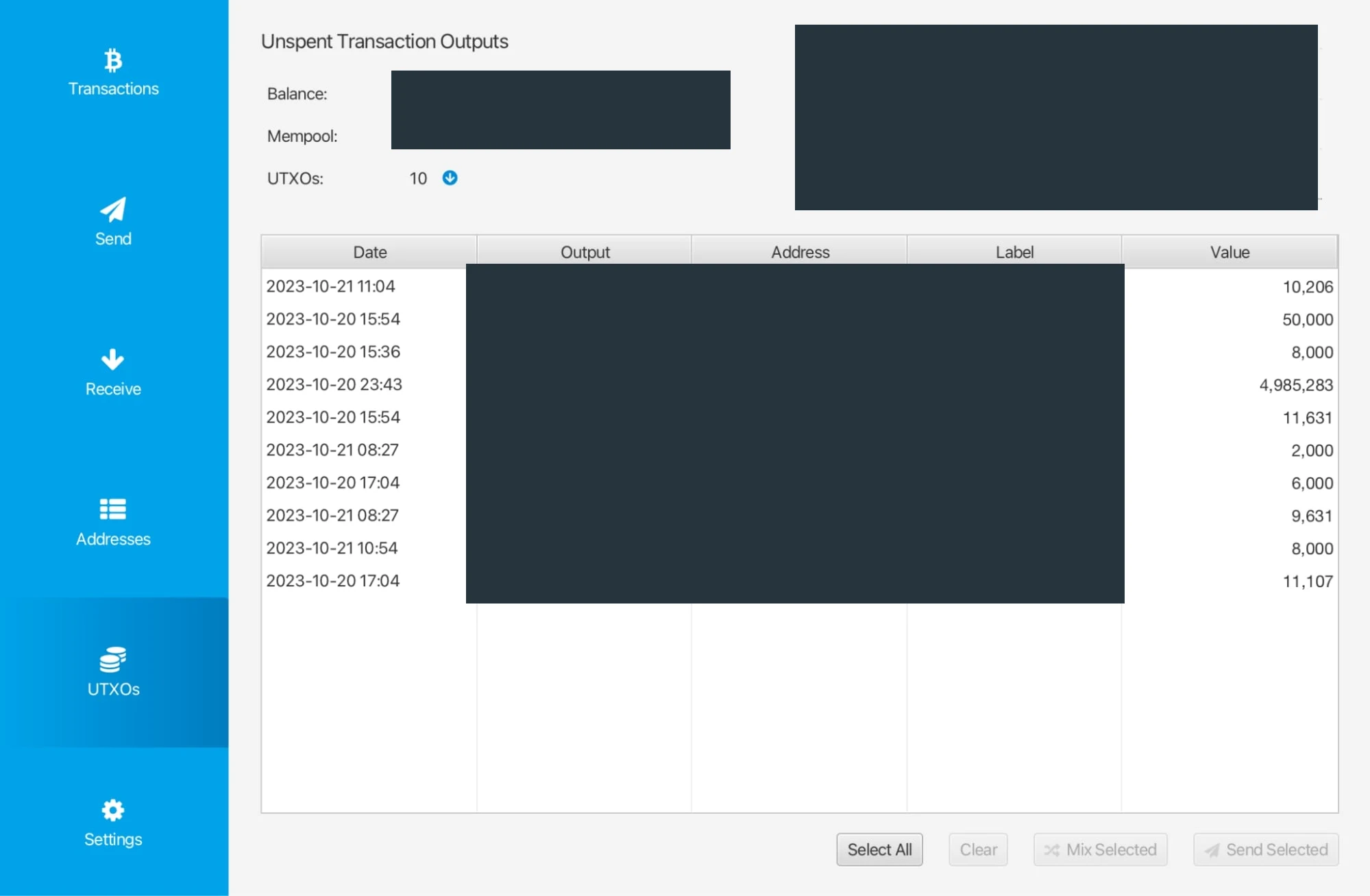
One row per output, each with its value: this is the list to read. From Brady Noah's October 2023 testnet walkthrough on What Is Bitcoin, identifiers masked.
For the coins a payment would spend, note the value in sats, the confirmation status, the address type, and any label about where they came from. An output is identified by its transaction ID and output index, not just its address, and one transaction can hold several of yours.
Don't import recovery words into a new app just to get this view. A fee comparison never needs recovery words or private keys, and even an extended public key reveals the account's whole address history. If your wallet doesn't list individual outputs, its unsigned send preview is enough. Looking up every address on a third-party explorer discloses more than the fee question requires.
If you can't tell an input's type, write "unknown" rather than assuming 68 vB, and compare full previews instead.
Pick the fix from what the preview shows
- Rate too high for the urgency: lower it within your wallet's relay floor.
- Old address type: receive new coins to bc1q or bc1p, and consider moving old ones while fees are low.
- Many related coins actually needed: model a consolidation first, counting today's fee and the later saving. A wallet without coin control can merge only by sending its whole balance to itself, which has limits of its own.
- Only a few coins fund the payment: leave the rest alone. A long UTXO list doesn't demand action.
- A tiny receipt you don't recognize: spending it just to tidy the list isn't worth it. Label or freeze it instead.
- Preview and coin list disagree: stop before signing and find the extra input, change output, or type assumption.
- Already broadcast at a rate you regret: a replacement can only raise the fee, never lower it, and once confirmed the fee is gone. Note the rate you paid and set a custom rate on the next send.
Fewer inputs can lower the fee. But combining unrelated funds shows on the blockchain that they belong together. Exchange withdrawals, personal payments, and public donations may deserve separate groups even when one big transaction looks cheaper, and sending the result to a fresh address doesn't undo that link. If the cheaper preview merges coins you wanted apart, or changes what the recipient gets, it isn't the same payment for less.